LESS 导入CSS选项关键字
描述
@import(css)会将文件导入为常规CSS,而不管文件扩展名。 这是在版本1.4.0 中发布的。
例子
以下示例演示如何在LESS文件中使用 css 关键字:
<html>
<head>
  <link rel="stylesheet" href="style.css" type="text/css" />
  <title>Import Options CSS</title>
</head>
<body>
<h1>Welcome to Tutorialspoint</h1>
<p class="para_1">LESS is a CSS pre-processor that enables customizable, manageable and reusable style sheet for web site.</p>
<p class="para_2">LESS is a CSS pre-processor that enables customizable, manageable and reusable style sheet for web site.</p>
</body>
</html>
接下来,创建文件 style.less 。
style.less
@import (css) "//www.w3cschool.cn/statics/demosource/css.txt";
.para_1 {
    color: green;
    .my_css;
}
.para_2 {
    color: blue;
}
css.txt文件将被从路径//www.w3cschool.cn/statics/demosource/css.txt导入到style.less,以下代码:
css.text
.my_css {
    font-family: "Comic Sans MS";
    font-size: 20px;
}
您可以使用以下命令将 style.less 编译为 style.css :
lessc style.less style.css
接下来执行上面的命令,它将用下面的代码自动创建 style.css 文件:
style.css
.my_css {
  font-family: "Comic Sans MS";
  font-size: 20px;
}
.para_1 {
  color: green;
  font-family: "Comic Sans MS";
  font-size: 20px;
}
.para_2 {
  color: blue;
}
输出
让我们执行以下步骤,看看上面的代码如何工作:
将上面的html代码保存在 import_options_css.html 文件中。
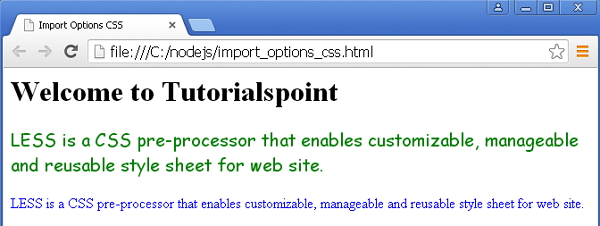
在浏览器中打开此HTML文件,将显示如下输出。