
codecamp

HTML figure

HTML figure

figure 和 figcaption 元素

figure标签规定独立的流内容(图像、图表、照片、代码等等)。

figure元素的内容应该与主内容相关,同时元素的位置相对于主内容是独立的。如果被删除,则不应对文档流产生影响。

figcaption元素被用来为figure元素定义标题。

例子

你可以在下面的代码中看到一起使用的 figure figcaption 元素。


<!DOCTYPE HTML>
<html>
<body>
  I like XML and CSS.
  <figure>
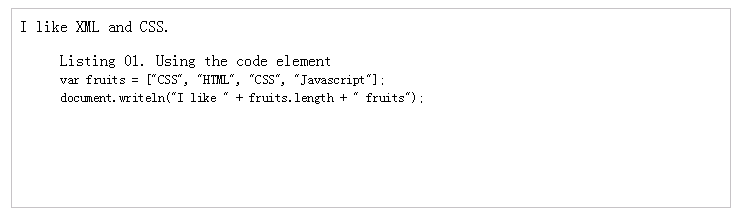
    <figcaption>Listing 01. Using the code element</figcaption>
    <code>
      var fruits = ["CSS", "HTML", "CSS", "Javascript"];<br>
      document.writeln("I like " + fruits.length + " fruits");
    </code>
  </figure>
</body>
</html>

上面的代码渲染如下:


HTML 列表
HTML 图像
温馨提示
下载编程狮App,免费阅读超1000+编程语言教程
取消
确定
目录

关闭

MIP.setData({ 'pageTheme' : getCookie('pageTheme') || {'day':true, 'night':false}, 'pageFontSize' : getCookie('pageFontSize') || 20 }); MIP.watch('pageTheme', function(newValue){ setCookie('pageTheme', JSON.stringify(newValue)) }); MIP.watch('pageFontSize', function(newValue){ setCookie('pageFontSize', newValue) }); function setCookie(name, value){ var days = 1; var exp = new Date(); exp.setTime(exp.getTime() + days*24*60*60*1000); document.cookie = name + '=' + value + ';expires=' + exp.toUTCString(); } function getCookie(name){ var reg = new RegExp('(^| )' + name + '=([^;]*)(;|$)'); return document.cookie.match(reg) ? JSON.parse(document.cookie.match(reg)[2]) : null; }