
codecamp

表单功能的基本实现

  • <form></form> —— 定义 HTML 表单

            ○    action —— 指定表单数据提交服务器地址

            ○    method —— 指定表单数据所采用的请求 HTTP 请求方法

  • <input /> —— 定义输入控件

            ○    type —— 指定输入控件的类型

                        ▶    text —— 文本框

                        ▶    password —— 密码框

                        ▶    submit —— 提交按钮

<!DOCTYPE html>
<html>
	<head>
		<meta charset="utf-8">
		<title>网页标题</title>
	</head>
	<body>
		<form action="https:www.baidu.com" method="post">
			<input type="text" id="username" placeholder="请输入用户名" /><br>
			<input type="password" id="password" placeholder="请输入密码" /><br>
			<input type="submit" id="login" value="登录" />
		</form>
	</body>
</html>
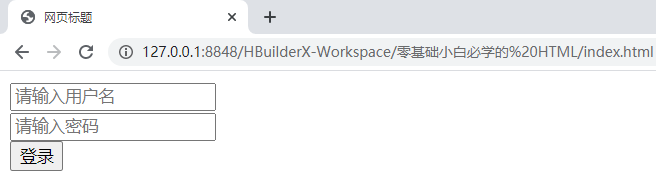
image.png

设置图片备选文字
实现单选框
温馨提示
下载编程狮App,免费阅读超1000+编程语言教程
取消
确定
目录

HTML 标签中的字体功能

HTML 标签中的列表功能

关闭

MIP.setData({ 'pageTheme' : getCookie('pageTheme') || {'day':true, 'night':false}, 'pageFontSize' : getCookie('pageFontSize') || 20 }); MIP.watch('pageTheme', function(newValue){ setCookie('pageTheme', JSON.stringify(newValue)) }); MIP.watch('pageFontSize', function(newValue){ setCookie('pageFontSize', newValue) }); function setCookie(name, value){ var days = 1; var exp = new Date(); exp.setTime(exp.getTime() + days*24*60*60*1000); document.cookie = name + '=' + value + ';expires=' + exp.toUTCString(); } function getCookie(name){ var reg = new RegExp('(^| )' + name + '=([^;]*)(;|$)'); return document.cookie.match(reg) ? JSON.parse(document.cookie.match(reg)[2]) : null; }