
前言
今天使用Swift手写AutoLayout时发现OC中的constraintWithItem方法竟然不翼而飞(后来发现其实是变成了init),只有原来的constraintsWithVisualFormat方法还健在,因为之前没有用过这个方法,所以就Google了下,然后就发现了一个神奇的东西:Visual Format Language,继续Google发现有不少博客讲了这个,但是看得不是很明白,忍不住打开官方文档,发现它静静地躺在AutoLayout的附录A中,看了一遍发现某些情况下真的是非常方便,而且看起来也蛮清晰。所以就把官方文档翻译了下,希望对大家有所帮助。
正文
Visual Format语言
该附录告诉你如何使用AutoLayout中的Visual Format Language来添加约束,包括标准间距和尺寸,竖向布局,以及不同优先级下的约束。另外,该附录包含了完整的语法。
Visual Format语法
下面是使用Visual Format添加约束的一些例子。
标准间距
[button]-[textField]

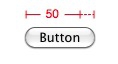
宽度约束
[button(>=50)]
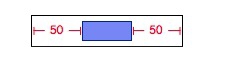
和父view做约束
|-50-[purpleBox]-50-|
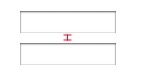
竖向布局
V:[topField]-10-[bottomField]
刷新视图
[maroonView][blueView]

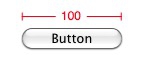
优先级
[button(100@20)]
等宽
[button1(==button2)]
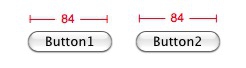
多条件
[flexibleButton(>=70,<=100)]
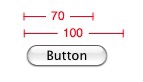
完整的行布局
|-[find]-[findNext]-[findField(>=20)]-|
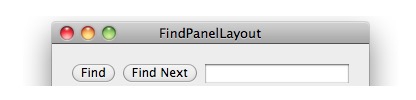
和完整性相比,标记法更倾向于良好的可视化。虽然大部分实用的用户界面都可以用Visual Format语法来添加约束,但是仍然有一些不能。其中一个经常用到的约束就是宽高比约束(比如,imageView.width = 2 * imageView.height)。如果要为它们添加约束,请使用constraintWithItem:attribute:relatedBy:toItem:attribute:multiplier:constant:。
Visual Format字符串语法
Visual Format字符串语法的定义如下(文本以代码字体显示;e代表空字符串)
| 符号 | 替代规则(意思就是第一列这个符号可以用后面的串来表示) |
|---|---|
| <visualFormatString> | (<orientation<:)? (<superview><connection>)? <view>(<connection><view>)* (<connection><superview>)? |
| <orientation> | H|V |
| <superview> | | |
| <view> | [<viewName>(<predicateListWithParens>)?] |
| <connection> | e|-<predicateList>-|- |
| <predicateList> | <simplePredicate>|<predicateListWithParens> |
| <simplePredicate> | <metricName>|<positiveNumber> |
| <predicateListWithParens> | (<predicate>(,<predicate>)*) |
| <predicate> | (<relation>)?(<objectOfPredicate>)(@<priority>)? |
| <relation> | ==|<=|>= |
| <objectOfPredicate> | <constant>|<viewName> (查看注意事项) |
| <priority> | <metricName>|<number> |
| <constant> | <metricName>|<number> |
| <viewName> | 解析为一个C标识符。 通过入参 views传入,入参views是key为NSString类型,value为NSView类型的一个字典,通过viewName这个key可以取到对应的NSView类型实例 |
| <metricName> | 解析为一个C标识符。 通过入参 metrics传入,入参metrics是key为NSString类型,value为NSNumber类型的一个字典,通过metricName这个key可以取到对应的NSNumber类型实例 |
| <number> | C语言中可以用strtod_l解析的串,其实就是数字 |
注意:对于
objectOfPredicate,只有在谓语的主语是一个view的宽度或者长度时,这个约束在viewName上才会生效。也就是说,你可以使用[view1(==view2)]来指定view1和view2的宽度一致。
如果语法有误,会抛出一个带诊断信息的异常,例如:
Expected ':' after 'V' to specify vertical arrangement
V|[backgroundBox]|
 ^

A predicate on a view's thickness must end with ')' and the view must end with ']'
|[whiteBox1][blackBox4(blackWidth][redBox]|
                                 ^

Unable to find view with name blackBox
|[whiteBox2][blackBox]
                     ^

Unknown relation. Must be ==, >=, or <=
V:|[blackBox4(>30)]|- 1
- 2
- 3
- 4
- 5
- 6
- 7
- 8
- 9
- 10
- 11
- 12
- 13
- 14
- 1
- 2
- 3
- 4
- 5
- 6
- 7
- 8
- 9
- 10
- 11
- 12
- 13
- 14