
z-index取值规范
z-index取值规范
目前人人页面中的弹层较多,z-index取值也比较随意,导致相互覆盖的情况,有的弹层直接覆盖了顶部导航条。
以下是首页的一些z-index取值比较大的属性设置统计:
| header头部导航条 | 1999 |
| 账号菜单 | 10001 |
| 通知提醒 | 10000 |
| 顶部搜索结果弹窗 | 10001 |
| 页面内容顶部/publisher | 1998 |
| publisher电影搜索提示 | 1000 |
| 用户等级与登录信息提醒 | 1999 |
| 回到顶部按钮 | 999 in css, 1001 in html |
| @ | 10001 |
| 表情 | 10001 |
| 名片卡 | 9999 |
| 底部工具条与webpager/radio | 1000 in css, 1999 in html |
| 照片浏览弹层 | 5000 |
| 照片多张上传弹层 | 3001 |
| XN默认弹层组件 | 10000 |
| 首页应用中心推荐弹层 | 1002 |
| HTML5拖拽上传 | 999998 |
其他z-index设置:
| .dropmenu-holder | 999999 |
| .appsMenuPro | 10001 |
| .search-Result | 10002 !important |
| .menu-dropdown | 200 |
| .site-nav .navigation | 981 |
| .mentionFrdList | 10002!important |
| .app-center-popup | 1002 |
| .feed-back-v6 | 1999 |
| #appcardcontent | 1998 |
| .feed-comment-attach | 1000 |
| .message-box | 1000 |
| #friendcreate-box | 100 |
这些z-index设置,极有可能造成相互覆盖,存在潜在的问题风险。例如:
1、publisher在导航条以下,但是在publisher中弹出的@、表情却在导航条以上。

2、XN的默认弹层样式穿透导航条
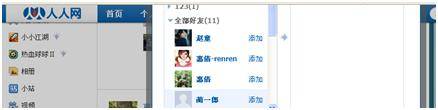
3、@组件与名片卡组件相互重叠

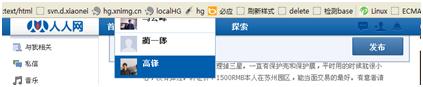


因此,有必要对z-index取值进行规范和约束。避免前端开发人员为了自己开发的功能能够正确展示,而忽略了其他组件的展示需求。
如果要为弹层设置z-index,请务必按照给定的取值区间来进行设置。
这里只是初稿,可能还需要精确到某一个组件的z-index分配,需要大家集思广益(可以参考cookie的设置流程,在使用z-index时必须经过审批)
| 头部导航区域 | [1999 - 2100] |
| publisher所在的内容head区 | [1998] |
| 页面主要内容区域 | [-1 - 1997] |
| 页面底部 | [1999 - 2100] |
| 首页应用弹层 | [1000] |
| 全站公共组件 | [-1 - 1999] |
| 全页面蒙层弹窗组件 | [10000-11000] |