
codecamp

Unity Resolution and conflict

When you add a package to a project manifest, Unity considers that package a dependency of the project (a direct dependency). However, a package can also have dependencies on other packages, which create indirect dependencies in any projects that require that package.

Since most projects require more than one package in order to develop games and apps, the Package Manager has to evaluate all the requested package versions to retrieve from the registry (whether direct or indirect), and decide which among those package versions to install. To do this, it computes the set of packages that satisfies all direct and indirect dependencies in the project, starting with the project dependencies and recursively exploring each indirect dependency, collecting all the dependency information, then picking a set of packages that satisfies the dependency requirements without any conflict. For example, this dependency graph represents a project with four direct dependencies and all of their indirect dependencies:
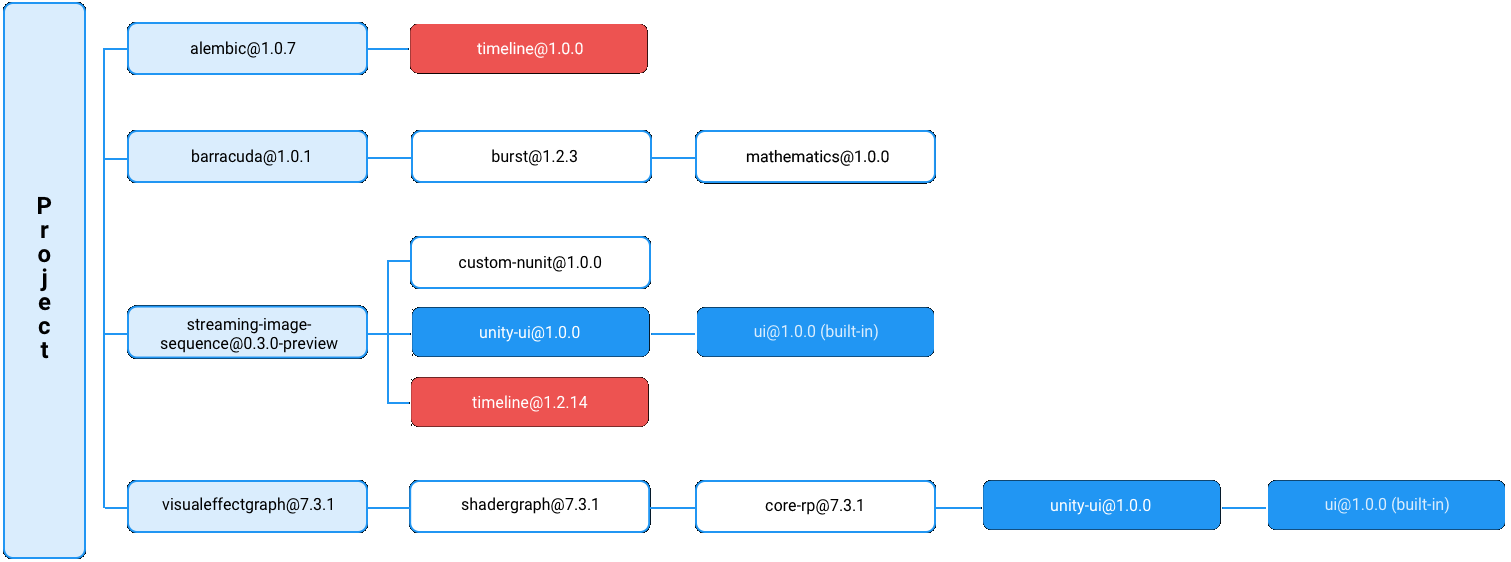
A graph of direct and indirect package dependencies for a project A graph of direct and indirect package dependencies for a project

In this example:

  • The light blue nodes represent the project’s direct dependencies.
  • The dark blue nodes show the same package and version as indirect dependencies in this project.
  • The red nodes show two different versions of the same package, which is a conflict.

Note: Only package dependencies declared with versions need to be resolved. The Package Manager selects packages installed from other sources, such as embedded packages, and dependencies declared with local paths, Git URLs, and built-in packages over version-based dependencies.

Choosing the best solution

Depending on the set of packages defined in the project manifest, it could take a long time to evaluate all possible package combinations: a project could potentially depend on hundreds of packages, each of which depend on hundreds of other packages, most requiring different versions.

Lock files and resolutionStrategy

To provide the most efficient solution, the Package Manager prioritizes package versions that it previously used by tracking them in a lock file. This guarantees that subsequent dependency resolution using the same inputs results in the same outputs. It also minimizes time-consuming operations such as downloading, extracting, or copying packages.

Sometimes, the Package Manager cannot find a solution that only includes locked packages. In this case, the Package Manager uses the solution with the least risky upgrades, preferring patch upgrades over minor or major upgrades, and minor upgrades over major upgrades by default. However, you can customize how aggressive you want the Package Manager to be when considering a higher version with the resolutionStrategy property.

示例

In this example, there are multiple versions of the following packages requested:

  • burst@1.2.2 (twice) and burst@1.3.0-preview.3
  • collections@0.5.1-preview.11 and collections@0.5.2-preview.8
  • jobs@0.2.4-preview.11 (twice) and jobs@0.2.5-preview.20

Using the set of direct and indirect dependencies, the Package Manager selects the highest version of the burst package (burst@1.3.0-preview.3), which satisfies the collections@0.5.2-preview.8 package’s dependency:
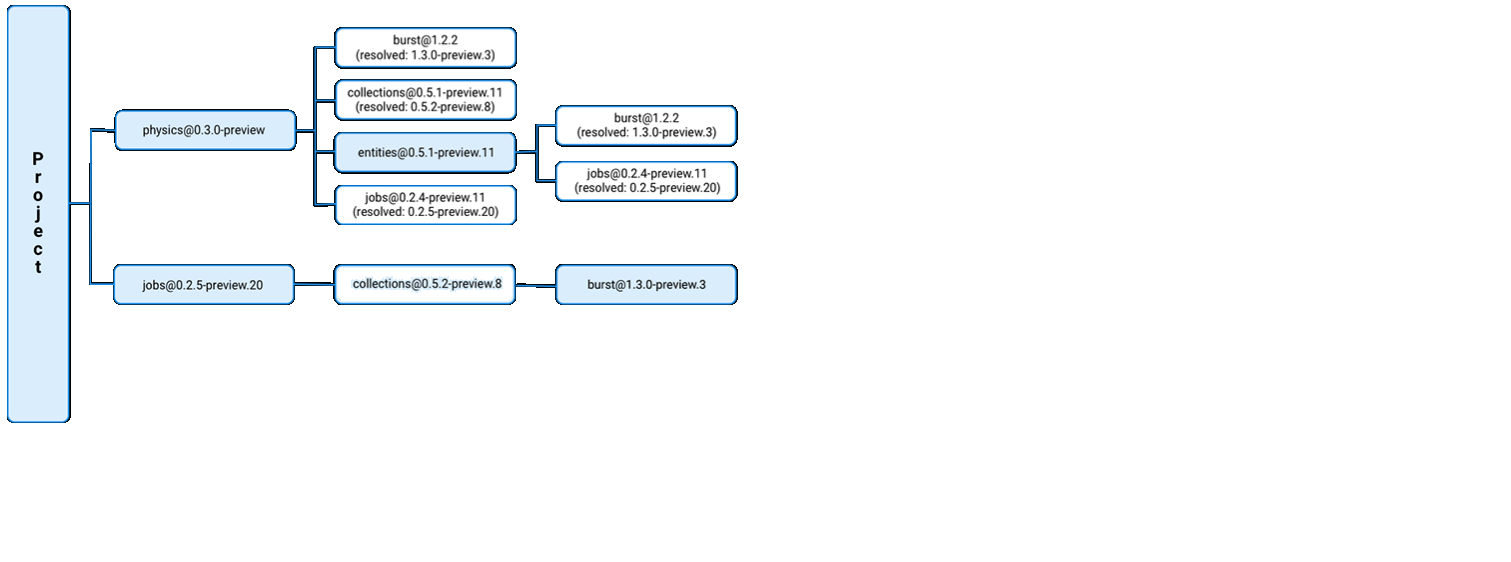
In the dependency graph, the blue nodes indicate which versions the Package Manager selected In the dependency graph, the blue nodes indicate which versions the Package Manager selected

Unity 检查包
Unity 故障排除
温馨提示
下载编程狮App,免费阅读超1000+编程语言教程
取消
确定
目录

Unity 包

Unity 的 Package Manager

Unity Configuration

Unity Package Manage 窗口

Unity 查找包

Unity 添加和移除包

Unity 检查包

Unity 包的脚本API

Unity Resolution and conflict

Unity 项目清单

Unity 故障排除

Unity 创建自定义包

Unity 包清单

使用Unity

安装 Unity

Unity 许可证和激活

启动 Unity

Unity Upgrading Unity

Unity Legacy Upgrade Guides

升级到 Unity 5.4

升级到 Unity 5.0

Unity 的界面

Unity Scene 视图

Unity 游戏对象定位

Unity Inspector 窗口

Unity 资源工作流程

Unity 使用 Asset Store

Unity 资源数据库

Unity AssetBundle

Unity 脚本与资源

Unity 创建游戏玩法

Uinty 场景

Unity Scene Templates

Unity 游戏对象

Unity 原始对象和占位对象

Unity 预制件

Unity 层

Unity 约束

Unity 发布构建

Unity 编辑器功能

Unity Project Settings

Unity 版本控制

无标题文章

Unity 基于文本的场景文件

Unity 扩展编辑器

无标题文章

Uinty Profiler overview

Uinty The Profiler window

Uinty 了解 Unity 中的优化

Unity 导入

Unity 导入模型

Unity Model Import Settings 窗口

Unity Rig 选项卡

UnityAnimation 选项卡

Unity SpeedTree Import Settings 窗口

Unity 在 Unity 外部创建资源

Unity 输入

Unity 移动设备输入

Unity 2D

Unity 精灵

Unity Sprite Editor

Unity 精灵图集

Unity 主精灵图集和变体精灵图集

Unity 准备要分发的精灵图集

Unity Tilemap

Unity Tilemap workflow

Unity 在瓦片地图上绘制

Unity 等距瓦片地图

Unity 可编程瓦片

Unity 可编程画笔

Unity 2D 物理系统参考

Unity 2D 碰撞体

Unity 2D 关节

Unity 2D 效应器

Unity 图形

Unity 渲染管线

Unity 内置渲染管线

Unity 内置渲染管线中的渲染路径

Unity 可编程渲染管线

Unity 摄像机

Unity 摄像机技巧

Unity 遮挡剔除

Unity 摄像机参考

Unity 光照

Unity 光源

Unity 光源

Unity 光照模式

Unity Cookies (filename: Cookies.md)

Unity 阴影

Unity Lighting Settings Asset

Unity 光照模式

Unity Light Explorer 窗口

Unity 光照贴图

Unity 渐进光照贴图程序

Unity 光照贴图 UV

Unity 使用 Enlighten(已弃用)的实时全局光照

Unity 光照探针

Unity 反射探针

Unity 预计算的光照数据

Unity 网格、材质、着色器和纹理

Unity 网格组件

Unity 文本网格

Unity 程序化网格几何体

Unity 创建和使用材质

Unity 纹理

Unity 导入纹理

Unity Texture compression formats

Unity 编写着色器

Unity 标准着色器

Unity 材质参数

Unity 旧版着色器

Unity 普通着色器系列

Unity 透明着色器系列

Unity 透明镂空着色器系列

Unity 自发光着色器系列

Unity 反光着色器系列

Unity 着色器参考

Unity 编写表面着色器

Unity 编写顶点和片元着色器

Unity ShaderLab 语法

ShaderLab:SubShader

Unity 高级 ShaderLab 主题

Unity 粒子系统

Unity 创建环境

Unity 天空

Unity 视觉效果组件

Unity 高级渲染功能

Unity 优化图形性能

Unity 颜色空间

Unity 图形教程

Unity 物理系统

Unity Scripting

Unity Setting Up SCripting Environment

Unity Scripting concepts

Unity Important Classes

Unity architecture

Unity Overview of .NET in Unity

Unity Scripting backends

Unity Code reloading in the Unity Editor

Unity 脚本序列化

Unity Script compilation

Unity Assembly definitions

Unity 多玩家和联网

Unity 音频

Unity 动画

Unity 用户界面 (UI)

Unity 导航和寻路

Unity 服务

Unity Setting up your project for Unity services

Unity Organizations

Unity Analytics

Unity Analytics Dashboard

Unity Analytics 事件

Unity 自定义事件

Unity Remote Settings

Unity 在 Unity 项目中使用 Remote Settings

Unity 变现

Unity 升级 Unity Analytics

Unity Analytics 和欧盟一般数据保护条例 (GDPR)

Unity Cloud Build

Unity Cloud Content Delivery

Unity IAP

Unity 设置 Unity IAP

Unity 跨平台指南

Unity 应用商店指南

Unity 实现应用商店

Unity 应用商店模块

Unity Collaborate

Unity XR

Unity 单通道立体渲染(双宽渲染)

Unity XR SDK

Unity Provider setup

Unity Subsystems

Unity Interfaces

Unity 开源代码仓库

Unity Asset Store 发布

Unity 平台开发

Unity 实验性

Unity 旧版主题

关闭

MIP.setData({ 'pageTheme' : getCookie('pageTheme') || {'day':true, 'night':false}, 'pageFontSize' : getCookie('pageFontSize') || 20 }); MIP.watch('pageTheme', function(newValue){ setCookie('pageTheme', JSON.stringify(newValue)) }); MIP.watch('pageFontSize', function(newValue){ setCookie('pageFontSize', newValue) }); function setCookie(name, value){ var days = 1; var exp = new Date(); exp.setTime(exp.getTime() + days*24*60*60*1000); document.cookie = name + '=' + value + ';expires=' + exp.toUTCString(); } function getCookie(name){ var reg = new RegExp('(^| )' + name + '=([^;]*)(;|$)'); return document.cookie.match(reg) ? JSON.parse(document.cookie.match(reg)[2]) : null; }