
Visual Basic (VB)数据类型一览表
在 Visual Basic 中,数据类型可用于定义变量可以保存的数据类型,例如我们的应用程序中的整数、浮点数、字符串等。
Visual Basic 是一种强类型编程语言。在对变量执行任何作之前,必须定义一个具有所需数据类型的变量,以指示该变量在我们的应用程序中可以保存什么类型的数据。
1. 值类型(Value Types)——存在栈里,省内存
| 关键字 | 占用字节 | 范围 | 示例值 | 后缀 |
|---|---|---|---|---|
Boolean |
1 | True / False | Dim ok As Boolean = False |
无 |
Byte |
1 | 0 ~ 255 | Dim b As Byte = 200 |
无 |
Short |
2 | -32 768 ~ 32 767 | Dim s As Short = -300 |
无 |
Integer |
4 | ±21 亿 | Dim i As Integer = 99999 |
无 |
Long |
8 | ±9×10¹⁸ | Dim l As Long = 1_0000_0000L |
L |
Single |
4 | ±3.4×10³⁸ | Dim f As Single = 3.14F |
F |
Double |
8 | ±1.7×10³⁰⁸ | Dim d As Double = 2.718 |
默认实数 |
Decimal |
16 | ±7.9×10²⁸,28 位精度 | Dim m As Decimal = 123.456D |
D |
Date |
8 | 0001-01-01 ~ 9999-12-31 | Dim dt As Date = #2025-09-18# |
无 |
Char |
2 | 单个 Unicode 字符 | Dim c As Char = "A"c |
c |
提示:
1_0000_0000中的下划线只是分隔符,编译器自动忽略,方便读大数。
2. 引用类型(Reference Types)——存在堆里,地址传递
| 关键字 | 说明 | 示例 |
|---|---|---|
String |
不可变字符串 | Dim s As String = "Hello" |
Object |
所有类型基类 | Dim o As Object = 123 |
Array |
固定长度 | Dim arr(2) As Integer |
List(Of T) |
泛型可变列表 | Dim lst As New List(Of Integer) |
3. 可空类型(Nullable Value Type)
值类型后加 ? 即可接受 Nothing:
Dim age? As Integer = Nothing
If age.HasValue Then
    Console.WriteLine(age.Value)
Else
    Console.WriteLine("未填写年龄")
End If
4. 类型推断(Dim + 初值)
VB 10 起支持 Option Infer On(默认就是开),让编译器自动判断类型:
Dim price = 9.9          ' 推断为 Double
Dim name = "VB"          ' 推断为 String
Dim flag = True          ' 推断为 Boolean
5. 实战:一分钟小 demo
需求:定义各种变量 → 打印类型 + 占用字节
Imports System

Module TypeDemo
    Sub Main()
        Dim b As Byte = 255
        Dim i As Integer = 100_0000
        Dim d As Double = 3.1415926
        Dim money As Decimal = 2999.99D
        Dim today As Date = #2025-09-18#
        Dim txt As String = "Visual Basic"

        Console.WriteLine($"{b.GetType().Name,-7} {b,8} 字节数:{Runtime.InteropServices.Marshal.SizeOf(b)}")
        Console.WriteLine($"{i.GetType().Name,-7} {i,8} 字节数:{Runtime.InteropServices.Marshal.SizeOf(i)}")
        Console.WriteLine($"{d.GetType().Name,-7} {d,8} 字节数:{Runtime.InteropServices.Marshal.SizeOf(d)}")
        Console.WriteLine($"{money.GetType().Name,-7} {money,8} 字节数:{Runtime.InteropServices.Marshal.SizeOf(money)}")
        Console.WriteLine($"{today.GetType().Name,-7} {today:yyyy-MM-dd}")
        Console.WriteLine($"{txt.GetType().Name,-7} 长度:{txt.Length}")
    End Sub
End Module
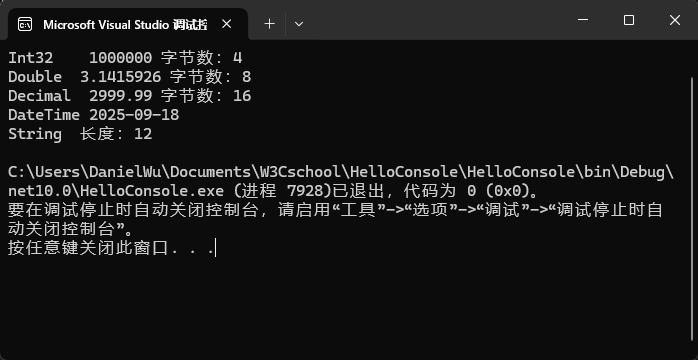
运行结果:
Byte      255 字节数:1
Integer 1000000 字节数:4
Double 3.1415926 字节数:8
Decimal 2999.99 字节数:16
DateTime 2025-09-18
String   长度:12
6. 类型转换速记
| 场景 | 关键字 | 示例 |
|---|---|---|
| 隐式转换 | 直接赋值 | Dim d As Double = 5 Integer→Double |
| 显式转换 | CType / DirectCast |
Dim x As Integer = CType(3.14, Integer) |
| 字符串转数值 | Integer.Parse / .TryParse |
Integer.TryParse("123", i) |
| 任意转字符串 | .ToString |
Dim s As String = 123.ToString |
7. 小结口诀
小数值用
Integer,大整数用Long,
钱相关用Decimal,小数科学Double,
真假判断Boolean,文本拼接String,
不知类型就Dim + 初值,编译器帮你推!