
Visual Basic (VB) If Else 语句详解
在 Visual Basic 中,If Else 语句或条件具有可选的 Else 语句,每当 If 条件执行失败时,就会执行 Else 语句。 通常,在 Visual Basic 中,If Else 语句,每当布尔表达式返回 true 时,都会执行 If 语句;否则,将执行语句的 Else 块。
If...Else 的作用
根据布尔表达式的值,二选一执行代码块;是块 If 的最常用形式。
官方语法:
If condition Then
    ' statements when true
Else
    ' statements when false
End If
Visual Basic If Else 语句流程图
下面是流程图,表示 Visual Basic 编程语言中 If Else 语句的流程。
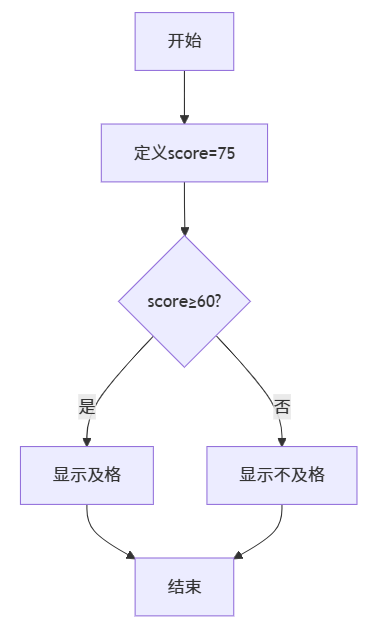
最小可运行示例
Module Demo
    Sub Main()
        Dim age As Integer = 17
        If age >= 18 Then
            Console.WriteLine("欢迎进入网吧")
        Else
            Console.WriteLine("未成年,下次再来")
        End If
    End Sub
End Module
输出:
未成年,下次再来带 ElseIf 的多分支(推荐)
当条件 > 2 个时,用 ElseIf 比嵌套 If 更清晰:
Dim score As Integer = 83
Dim grade As String

If score >= 90 Then
    grade = "A"
ElseIf score >= 80 Then
    grade = "B"
ElseIf score >= 70 Then
    grade = "C"
ElseIf score >= 60 Then
    grade = "D"
Else
    grade = "E"
End If

Console.WriteLine($"等级:{grade}") ' 等级:B提示:ElseIf 顺序从高到低,避免逻辑漏洞
嵌套 If...Else
Dim x As Integer = 10, y As Integer = -5
If x > 0 Then
    If y > 0 Then
        Console.WriteLine("第一象限")
    Else
        Console.WriteLine("第四象限")
    End If
Else
    Console.WriteLine("左侧半平面")
End If建议:嵌套层数 <= 3,否则抽方法或用 Select Case
AndAlso / OrElse 联合使用
Dim score As Integer = 85
Dim absence As Integer = 1

If score >= 60 AndAlso absence <= 2 Then
    Console.WriteLine("可以参加考试")
Else
    Console.WriteLine("无考试资格")
End If
用
AndAlso短路,避免后面空引用或除零
单行 If 函数(三元)对比
| 场景 | 块 If...Else | 三元 If 函数 |
|---|---|---|
| 多语句 | ✅ 支持 | ❌ 只能表达式 |
| 可读性 | 高 | 低(>2 层嵌套) |
| 短路 | ✅ | ✅ |
| 示例 | 见第 2 节 | Dim s = If(age>=18,"成年","未成年") |
建议:只赋值或简单返回时用三元,多语句仍用块 If...Else
示例:闰年判断(If...Else 版)
Module LeapYear
    Sub Main()
        Console.Write("请输入年份:")
        Dim y As Integer = CInt(Console.ReadLine())
        If y Mod 400 = 0 OrElse (y Mod 4 = 0 AndAlso y Mod 100 <> 0) Then
            Console.WriteLine($"{y} 是闰年")
        Else
            Console.WriteLine($"{y} 不是闰年")
        End If
    End Sub
End Module
运行示例:
请输入年份:2025
2025 不是闰年
最佳实践清单
- 条件尽量用函数封装,主流程保持简洁
- Else 必须处理「剩余所有情况」,避免漏逻辑
- ElseIf 按业务优先级从高到低书写
- 嵌套 > 3 层 → 改为
Select Case或抽方法 - 注释写「为什么」而不是「是什么」
小结口诀
If...Else 二选一,
ElseIf 多分支更整齐;
条件短路AndAlso,
嵌套三层要抽离!