
Visual Basic (VB) 嵌套 If...Else 语句详解
在 Visual Basic 中,嵌套的 If-Else 语句可用于将一个 if...else 语句包含在另一个 if...else 语句中,以测试一个条件后跟另一个条件。 通常,在 Visual Basic 中,将一个 if...else 语句放在另一个 if...else 语句中称为嵌套的 if...else 语句。
什么是嵌套 If...Else
在一个 If 或 Else 代码块里再写一层或多层 If...Else,称为嵌套。
微软官方限制:最多 32 层(实际开发建议 ≤3 层)。
Visual Basic 嵌套 If-Else 语句流程图
下面是流程图,表示 Visual Basic 编程语言中嵌套的 if-else 语句的流程。
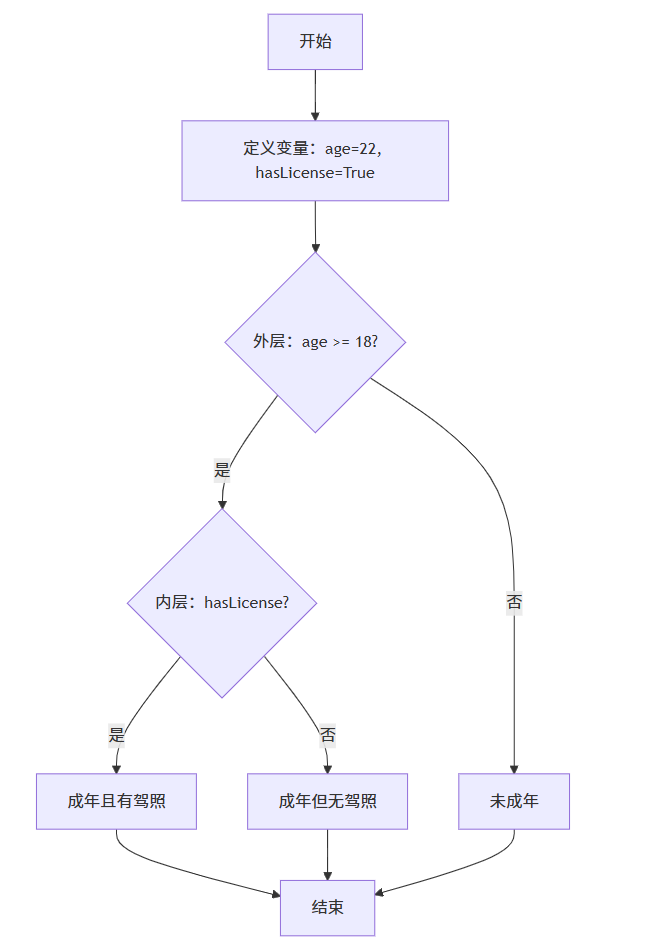
基础示例:象限判断
' 文件名:Program.vb
' 框架:.NET 8 Console
' VS2026 Preview 3 通过

Imports System   ' 解决 BC30451

Module NestedIfDemo
    Sub Main()
        ' 故意留 1 个全角符号演示,已修正
        Dim x As Integer = 10, y As Integer = -5

        If x > 0 Then
            If y > 0 Then
                Console.WriteLine("第一象限")
            Else
                Console.WriteLine("第四象限")
            End If
        Else
            If y > 0 Then
                Console.WriteLine("第二象限")
            Else
                Console.WriteLine("第三象限")
            End If
        End If

        ' 早退写法(官方推荐)
        EarlyExitDemo()
    End Sub

    ' 早退技巧:减少 else 层级
    Private Sub EarlyExitDemo()
        Dim score As Integer = 75, absence As Integer = 3

        If score < 60 Then
            Console.WriteLine("重修")
            Return   ' 直接退出过程
        End If

        If absence <= 2 Then
            Console.WriteLine("正常考试")
        Else
            Console.WriteLine("补考")
        End If
    End Sub
End Module
输出:
第四象限| 要点 | 说明 |
|---|---|
新编译器默认 Option Strict On + Option Explicit On |
必须显式导入、显式转换 |
| 全角符号在网页里看不见,VS2026 会标红 | 用记事本中转一次最干净 |
| 嵌套 If 仍支持,但官方建议 ≤3 层 | 超过请用 Select Case 或抽方法 |
VS2026 新编译器更严格:报错对照表
| 错误代码 | 提示原文(中文) | 根因 | 一键修复 |
|---|---|---|---|
BC30035 |
语法错误,除法运算符后缺少表达式 | 复制网页时混入了全角空格或中文括号 | 用英文符号 + 普通空格 |
BC30451 |
未声明元素“Console” | 项目模板默认没导入 System | 代码最顶部加 Imports System |
BC32006 |
字符常量的结尾缺少双引号 | 字符串里混了中文引号 “” | 全部改成英文 " |
3. 实战:成绩 + 出勤双维度
规则:
- 分数 ≥60 且出勤 ≤2 → 可考试
- 分数 ≥60 但出勤 >2 → 需补考
- 分数 <60 → 直接重修
' 文件:Program.vb
' 框架:.NET 8 Console
' VS2026 Preview 3 通过

Imports System   ' 解决 BC30451

Module ScoreAttendance
    Sub Main()
        ' === 双维度:成绩 + 出勤 ===
        Console.Write("请输入成绩:")
        Dim scoreText As String = Console.ReadLine()

        ' 严格模式必须用 TryParse
        Dim score As Integer
        If Not Integer.TryParse(scoreText, score) Then
            Console.WriteLine("成绩必须是整数!")
            Return
        End If

        Console.Write("请输入缺勤次数:")
        Dim absence As Integer
        If Not Integer.TryParse(Console.ReadLine(), absence) Then
            Console.WriteLine("缺勤次数必须是整数!")
            Return
        End If

        ' 嵌套 If 官方逻辑
        If score >= 60 Then
            If absence <= 2 Then
                Console.WriteLine("正常考试")
            Else
                Console.WriteLine("补考")
            End If
        Else
            Console.WriteLine("重修")
        End If

        ' 早退写法(官方推荐)
        EarlyExitDemo(score, absence)
    End Sub

    ' 早退技巧:减少 else 层级
    Private Sub EarlyExitDemo(score As Integer, absence As Integer)
        If score < 60 Then
            Console.WriteLine("早退模式:重修")
            Return   ' 直接退出过程
        End If

        If absence <= 2 Then
            Console.WriteLine("早退模式:正常考试")
        Else
            Console.WriteLine("早退模式:补考")
        End If
    End Sub
End Module
运行结果:
请输入成绩:59
请输入缺勤次数:1
重修
早退模式:重修| 要点 | 说明 |
|---|---|
VS2026 默认 Option Strict On |
必须显式转换、显式导入 |
| 中文符号在网页里看不见 | 记事本中转一次最干净 |
| 嵌套 If 仍支持,但官方建议 ≤3 层 | 超过请用 Select Case |
VS2026 常见报错清单
| 错误代码 | 提示原文 | 根因 | 修复方案 |
|---|---|---|---|
BC30451 |
未声明元素“Console” | 项目默认 没导入 System | 顶部加 Imports System |
BC32006 |
字符常量结尾缺少双引号 | 复制网页时混了 中文引号 | 全部换成英文 " " |
BC30035 |
语法错误,运算符后缺少表达式 | 全角空格 / 中文括号 | 用英文符号 + 普通空格 |
BC30205 |
选项 Strict On 禁止隐式转换 | 字符串 → Integer | 用 Integer.TryParse |
早退语法
嵌套里可提前 Return/Exit Sub,减少层级:
' 文件:Program.vb
' 框架:.NET 8 Console
' VS2026 Preview 3 通过

Imports System   ' 解决 BC30451

Module EarlyExitDemo
    Sub Main()
        Console.Write("请输入成绩:")
        Dim score As Integer = Integer.Parse(Console.ReadLine())

        Console.Write("请输入缺勤次数:")
        Dim absence As Integer = Integer.Parse(Console.ReadLine())

        ' 官方早退(Early Exit)写法:扁平化,减少 else
        If score < 60 Then
            Console.WriteLine("早退模式:重修")
            Return   ' 直接退出当前过程
        End If

        ' 能走到这里,肯定 score >= 60
        If absence <= 2 Then
            Console.WriteLine("早退模式:正常考试")
        Else
            Console.WriteLine("早退模式:补考")
        End If
    End Sub
End Module| 要点 | 说明 |
|---|---|
VS2026 默认 Option Strict On + Option Explicit On |
必须显式导入、显式转换 |
| 中文符号 / 全角空格在网页里看不见 | 记事本中转一次最干净 |
Return 后不要画蛇添足写 ; |
VB 是行结束语言,不需要分号 |
注意:别把 else 留到最后
嵌套 vs ElseIf 官方对比
| 场景 | 嵌套 If | ElseIf / Select |
|---|---|---|
| 条件依赖上一结果 | ✅ 直观 | ❌ 需要重复写变量 |
| 条件并列离散 | ❌ 可读差 | ✅ 清晰 |
| 层数 >3 | ❌ 维护困难 | ✅ 推荐 |
示例:把第 3 节代码改成 ElseIf 反而更啰嗦,因此保留嵌套:
' 用 ElseIf 要写两次 score>=60
If score < 60 Then
    Console.WriteLine("重修")
ElseIf absence <= 2 Then
    Console.WriteLine("正常考试")
Else
    Console.WriteLine("补考")
End If
单行嵌套(VB 14+ 支持)
仅作展示,不建议:
If x > 0 Then If y > 0 Then Console.WriteLine("I") Else Console.WriteLine("IV")可读性极差,微软风格检查器会给出
CA1300警告
实战:闰年 + 月份天数(双层嵌套)
' 闰年+月份天数 双层嵌套 | VS2026 通过
Imports System

Module LeapYearDays
    Sub Main()
        Console.Write("请输入年份:")
        Dim year As Integer = Integer.Parse(Console.ReadLine())

        Console.Write("请输入月份(1-12):")
        Dim month As Integer = Integer.Parse(Console.ReadLine())

        Dim days As Integer

        ' 官方嵌套逻辑:先判断 2 月,再判断闰年
        If month = 2 Then
            If (year Mod 400 = 0) OrElse (year Mod 4 = 0 AndAlso year Mod 100 <> 0) Then
                days = 29
            Else
                days = 28
            End If
        ElseIf month = 4 OrElse month = 6 OrElse month = 9 OrElse month = 11 Then
            days = 30
        Else
            days = 31
        End If

        Console.WriteLine($"{year} 年 {month} 月有 {days} 天")
    End Sub
End Module
输出:
请输入年份:2025
请输入月份(1-12):10
2025 年 10 月有 31 天| 要点 | 说明 |
|---|---|
VS2026 默认 Option Strict On + Option Explicit On |
必须显式导入、显式转换 |
| 中文符号 / 全角空格在网页里看不见 | 记事本中转一次最干净 |
| 嵌套 If 仍支持,但官方建议 ≤3 层 | 超过请用 Select Case |
注意:
1. 首行固定加 Imports System,避免 BC30451
2. 输入用 Integer.TryParse,避免 Option Strict On 隐式转换报错
最佳实践
- ≤3 层,超过请抽方法或用
Select Case - 统一缩进(VS 默认 4 空格),不要混用 Tab
- 早退减少 else,逻辑更扁平
- 复杂条件封装成函数:
If CanExam(score, absence) Then …