codecamp

TRAE IDE 忽略文件设置:保护隐私,优化代码索引

TRAE 默认忽略 .gitignore 文件中所罗列的文件。除此之外, 你可以自主设置 TRAE 在索引仓库时需要额外忽略的文件列表,以作为 .gitignore 文件中已定义规则的补充。

重要提示

使用 #Workspace#Folder 添加上下文时,被忽略的文件或文件夹将无法被作为上下文。

操作步骤

  1. 在 IDE 模式界面中,点击界面右上角的 设置 图标,进入设置中心。

    在 SOLO 模式界面中,点击对话面板右上角的 设置 图标,进入设置中心。

    2.在左侧导航栏中,选择 上下文,进入 上下文 面板。

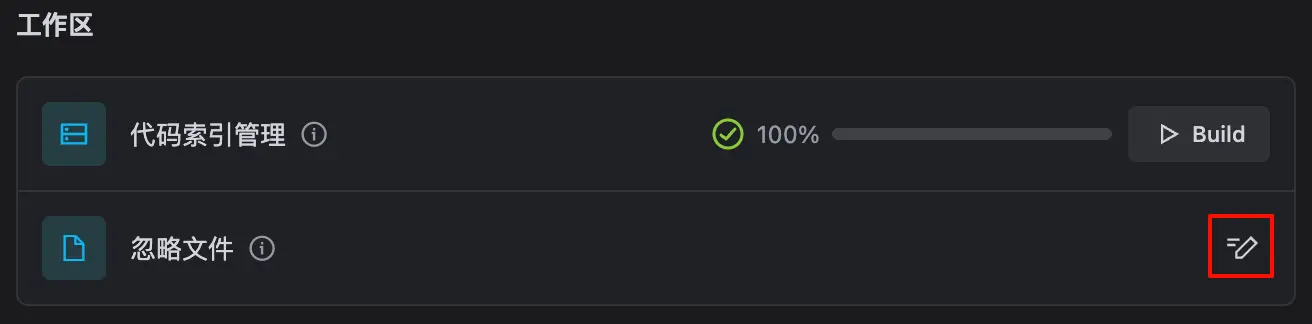
  2. 忽略文件 部分,点击 配置忽略文件 按钮。

    系统自动在 .trae 文件夹中创建 .ignore 文件并在编辑器中将该文件打开。

  3. .ignore 文件中添加需要忽略的文件并保存。
  4. 再次前往 上下文 页签。
  5. 代码索引管理 部分,点击 重新索引 按钮。

    TRAE 重新索引当前项目。本次索引将包含 .ignore 文件,使其生效。

示例

以下为 .ignore 文件内容的示例:

**/foo:         忽略 /foo, a/foo, a/b/foo 等
*.log:          忽略所有 .log 文件
config.js:      忽略当前路径的 config.js 文件

 
/mtk/           忽略整个文件夹
*.zip           忽略所有.zip文件
/mtk/do.c       忽略某个具体的文件
TRAE 使用 # 符号添加上下文:快速构建 AI 助手对话上下文
TRAE 模型上下文协议(MCP)- 连接外部工具与服务
温馨提示
下载编程狮App,免费阅读超1000+编程语言教程
取消
确定
目录

关闭

MIP.setData({ 'pageTheme' : getCookie('pageTheme') || {'day':true, 'night':false}, 'pageFontSize' : getCookie('pageFontSize') || 20 }); MIP.watch('pageTheme', function(newValue){ setCookie('pageTheme', JSON.stringify(newValue)) }); MIP.watch('pageFontSize', function(newValue){ setCookie('pageFontSize', newValue) }); function setCookie(name, value){ var days = 1; var exp = new Date(); exp.setTime(exp.getTime() + days*24*60*60*1000); document.cookie = name + '=' + value + ';expires=' + exp.toUTCString(); } function getCookie(name){ var reg = new RegExp('(^| )' + name + '=([^;]*)(;|$)'); return document.cookie.match(reg) ? JSON.parse(document.cookie.match(reg)[2]) : null; }