
codecamp

Trae Auto 模式:智能调度模型,极速问答体验

Auto 模式下,系统会综合考虑问答速度、性能与资源占用情况,智能调用合适的模型,提供更流畅的 AI 问答体验。

开启 Auto 模式

在 AI 对话输入框的右下角,点击模型名称以打开菜单,然后打开 Auto Mode 开关。
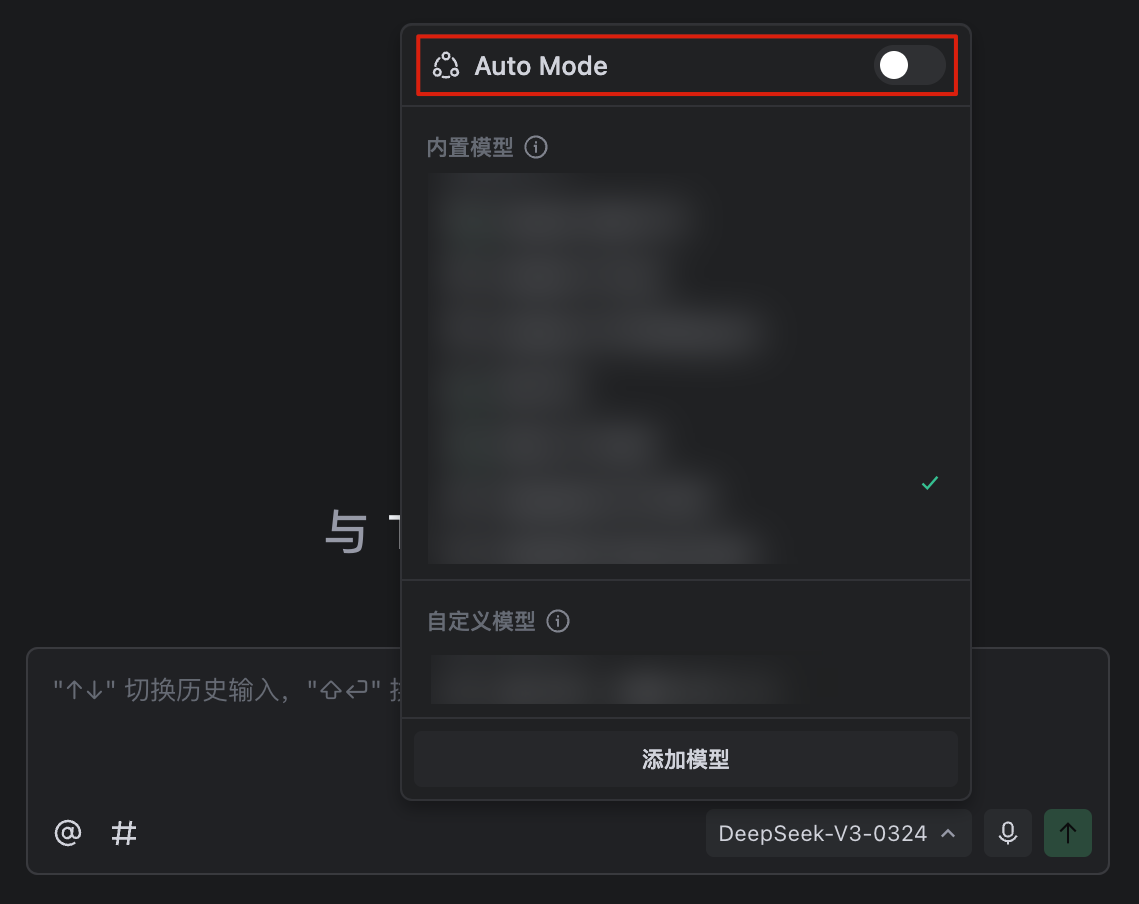
TRAE IDE 开启 Auto 模式

TRAE 自动运行 & 安全性
TRAE IDE CUE:智能编程工具助你高效开发
温馨提示
下载编程狮App,免费阅读超1000+编程语言教程
取消
确定
目录

关闭

MIP.setData({ 'pageTheme' : getCookie('pageTheme') || {'day':true, 'night':false}, 'pageFontSize' : getCookie('pageFontSize') || 20 }); MIP.watch('pageTheme', function(newValue){ setCookie('pageTheme', JSON.stringify(newValue)) }); MIP.watch('pageFontSize', function(newValue){ setCookie('pageFontSize', newValue) }); function setCookie(name, value){ var days = 1; var exp = new Date(); exp.setTime(exp.getTime() + days*24*60*60*1000); document.cookie = name + '=' + value + ';expires=' + exp.toUTCString(); } function getCookie(name){ var reg = new RegExp('(^| )' + name + '=([^;]*)(;|$)'); return document.cookie.match(reg) ? JSON.parse(document.cookie.match(reg)[2]) : null; }